Cloud Cost Anomaly Detection: How It Works
What a cost anomaly is
A cost anomaly is spend that departs from its usual pattern: a sudden spike, a step up that stays, a service nobody used last month, or a slow climb that no single day reveals. Anomaly detection compares each day's cost with what history says it should be, and raises an alert when the gap is large enough to matter.
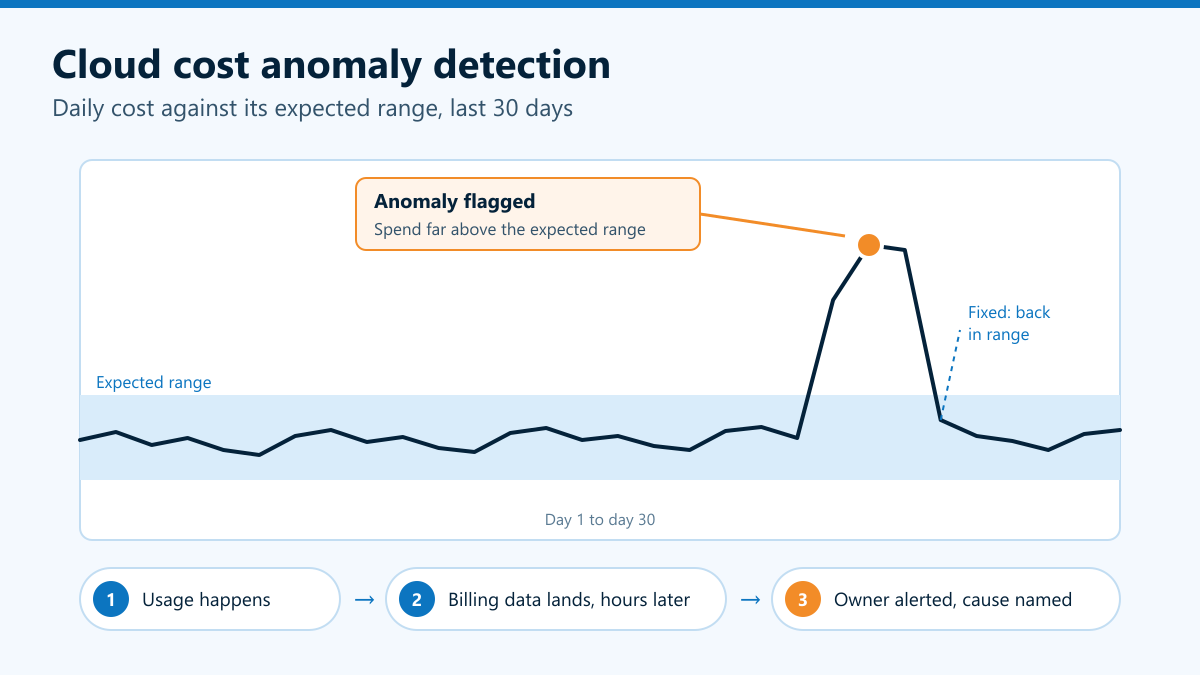
Not every large bill is an anomaly. A planned launch, a month-end batch job or a commitment purchase can all be expected. And not every anomaly is large: a new service at a few dollars a day can be the first sign of something that grows.
How cloud cost anomaly detection works
Every method follows the same three steps.
- Learn the expected range. The detector studies past spend, including weekly and monthly patterns, and predicts a range for each day.
- Compare and score. Each day's actual cost is compared with that range. The further outside it, the stronger the signal.
- Alert above a threshold. An alert fires only when the gap passes a threshold you set, usually as an amount, a percentage, or both.
The simplest version is a fixed threshold, such as "alert me above $2,000 a day", which is easy to understand and noisy as spend grows. Statistical and machine learning models adapt to seasonality and growth, which is what the three major clouds use today. Combining an amount with a percentage keeps alerts meaningful: a 300% jump on a $5 service is not worth a page, and neither is a $500 rise on a $200,000 day.
What AWS, Google Cloud and Azure include
All three clouds include anomaly detection in their cost tools. This is how each one works, from their documentation read on 2026-11-28.
| AWS Cost Anomaly Detection | Google Cloud cost anomaly detection | Azure Cost Management anomaly alerts | |
|---|---|---|---|
| Method | Machine learning models | An AI model based on past spend | A deep learning time-series model trained on 60 days of usage |
| How often it runs | About three times a day, after billing data is processed | Not stated in the current documentation | Once a day, per subscription |
| What it watches | AWS services, linked accounts, cost allocation tags or cost categories | Each project in a billing account | Each subscription |
| Alerts | Individual alerts through Amazon SNS, or daily and weekly summary emails | Email to billing admins, project owners, or Pub/Sub | Email, once per anomaly |
| Thresholds | An amount, a percentage, or both | Set from your usage; admins can change them | Fixed by the model's confidence range |
| Data delay | Cost data can be up to 24 hours behind | Billing export data takes hours to arrive and up to five days to fully catch up | Detection runs 36 hours after the day ends |
| Charge | No additional charge | Free, per Google's launch announcement | No charge for Cost Management features |
Two details matter in practice. AWS needs about 10 days of history before it can judge a newly used service. Azure works only at subscription scope, with up to five anomaly alert rules per subscription. Google Cloud also has a preview of early anomaly alerts for the Gemini API and Vertex AI, built on near real-time estimates.
Why no billing alert is instant
Detection can only be as fresh as the billing data behind it, and cloud billing data arrives hours, sometimes a day or more, after the usage. A runaway job can run for most of a day before any bill-based tool sees it. So anomaly detection tells you quickly that something went wrong, but it does not stop the spend while it happens.
Budgets do not stop it either, by default. Google Cloud says a budget does not cap spending on its own, and Azure says a budget leaves resources and consumption untouched. To stop spend you have to configure it:
- AWS: budget actions can apply an IAM policy or a service control policy, or stop chosen EC2 and RDS instances, either on their own or after your approval.
- Google Cloud: spend cap budgets, generally available since October 2026 for a limited set of services including the Gemini API and Cloud Run, pause a service when its cap is reached. Budget notifications through Pub/Sub can also drive your own automation.
- Azure: an action group on a budget can call an Automation runbook that you write to stop resources.
For the risks that grow fastest, such as AI API usage or autoscaling, set quotas and spend limits at the provider as well. Treat anomaly detection as the alarm, and limits as the circuit breaker.
How to set it up so someone acts on each alert
- Watch where owners live. A monitor on the whole bill finds the big spikes. Monitors per account, project or team tag find the ones each owner can fix.
- Use an amount and a percentage together. Start with thresholds that would have caught last quarter's real surprises, then tune them every few weeks.
- Send each alert to its owner, where they work. An alert in a shared inbox nobody reads is the same as no alert. Route it by email, chat or a ticket to the team that owns the spend.
- Name the likely cause. The alert should say which service, account, resource or usage type moved, so the owner starts with an answer, not a search.
- Close every alert. Mark it expected, fixed or accepted. The record shows which thresholds are too tight, and which causes keep coming back.
- Watch for missing discounts too. When a Savings Plan or reservation expires, the same usage moves to on-demand prices. That looks like a spike with no change in usage.
Common causes worth checking first
- Test and development environments left running after a project ends
- Autoscaling that scaled up and never came back down
- Data transfer surges between regions or out to the internet
- Logging and monitoring volume after a debug setting was left on
- A new AI model or API key put into production
- Expired commitments, or a price change on a service you use heavily
How Finitizer helps
Finitizer CloudIQ AWS and Finitizer CloudIQ GCP flag cost spikes and price changes from your billing data and show where the month is heading, alongside the findings that explain them. For AI spend, Finitizer Tokenomics flags an unusual day or a new spend source once refreshed billing data shows it, and sends it to its owner by email, Slack or Microsoft Teams, or opens it as a Jira issue. Neither blocks requests: spend limits stay at your provider. To see what your own bill holds first, start with the free Cloud Cost Assessment.
Frequently asked questions
What is cloud cost anomaly detection?
It is a check that compares each day's cloud spend with an expected range learned from past spend, and alerts when cost moves well outside that range. It catches spikes, new services and step changes early, so the team that owns the spend can find the cause before the month closes.
How quickly can a cloud cost anomaly be detected?
Only as fast as billing data arrives. AWS cost data can be up to 24 hours behind, and its detector runs about three times a day. Azure evaluates each day 36 hours after it ends. Google Cloud billing data takes hours to arrive. Expect hours to a day or more, not minutes.
Does AWS Cost Anomaly Detection cost anything?
AWS lists Cost Anomaly Detection at no additional charge. It is part of Cost Explorer, which must be turned on. Accounts that enabled Cost Explorer after March 2023 get a default monitor for all AWS services with a daily summary email, and you can add monitors per account, tag or cost category.
Do cloud budgets stop spending when the limit is reached?
Not by default. AWS, Google Cloud and Azure budgets send alerts, and spending continues. To stop spend you configure it: AWS budget actions, Google Cloud spend cap budgets for a limited set of services, or an Azure action group that runs your own automation. Quotas at the provider are another safeguard.
What thresholds should I use for cost anomaly alerts?
Combine an amount with a percentage, so small services do not page anyone for a large percentage jump and large services do not hide a costly rise. Start from the surprises you missed last quarter, route each alert to its owner, and review the thresholds every few weeks.
Sources
Provider documentation, read on 2026-11-28:
- AWS: Detecting unusual spend with Cost Anomaly Detection, getting started, Cost Anomaly Detection FAQs, Cost Explorer, budget actions, AWS Startup Security Baseline
- Google Cloud: cost anomalies, billing export to BigQuery setup, budgets, spend cap budgets, launch announcement
- Microsoft Azure: identify anomalies and unexpected changes in cost, understand Cost Management data, create and manage budgets