AI Cost Management: How to Control LLM Spend
What AI cost management means
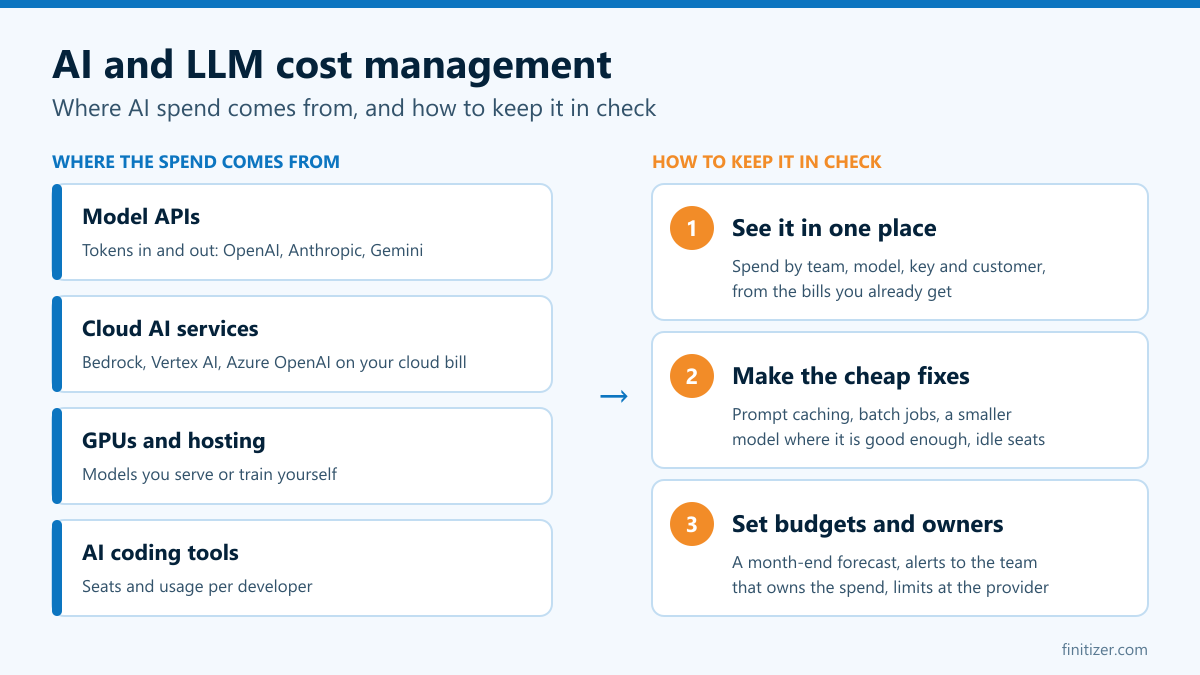
AI cost management is how an organization tracks, assigns and controls what it spends on AI: model APIs, AI services on its cloud bills, GPUs, and AI coding tools. It borrows from cloud cost management, with three differences. The unit is the token, not the server hour. Prices change every few months as new models arrive. And the spend lands on several bills at once, so no single invoice shows the whole picture.
Prices and rules on this page come from the providers' documentation, read on 2026-11-28 and listed under Sources at the end. Check them again before you set a budget: they change often.
Where AI spend comes from
- Model APIs. OpenAI, Anthropic and the Google Gemini API bill per token, on their own invoices.
- AI services on your cloud bill. Amazon Bedrock, Google Cloud's Vertex AI (which Google now documents as part of the Gemini Enterprise Agent Platform) and Azure OpenAI appear on your cloud bill, mixed in with everything else.
- GPUs and hosting. Models you serve or train yourself are billed per GPU hour, whether the GPUs are busy or not.
- AI coding tools. Tools such as Claude Code, GitHub Copilot and Cursor bill per seat, per use, or both.
How LLM pricing works
Model APIs price input tokens (what you send) and output tokens (what the model writes) separately, per million tokens. On each provider's flagship model, output costs five times as much as input:
| Provider | Flagship model | Input, per 1M tokens | Output, per 1M tokens |
|---|---|---|---|
| OpenAI | gpt-6.2-astra, prompts up to 272K tokens | $8.00 | $40.00 |
| Anthropic | Claude Fable 5.2 | $8.00 | $40.00 |
| Gemini 4 Carbon, from December 1, 2026 | $4.00 | $20.00 |
Three details move the bill more than the headline rate:
- Long prompts can cost more per token. OpenAI lists gpt-6.2-astra at $16.00 input and $60.00 output above 272K input tokens.
- Thinking counts as output. Google's price list says Gemini output includes thinking tokens, so a short answer from a reasoning model can carry a long bill.
- Prices change. Gemini 4 Carbon lists at $2.00 input and $10.00 output until November 30, 2026, and doubles on December 1. Anthropic's recommended default, Claude Opus 5.5, lists at $4 input and $20 output, half the price of Claude Fable 5.2.
The cheapest fixes first
Batch the work that can wait
Reports, evaluations, document processing and data labeling rarely need an answer in seconds. Every major provider offers a batch mode at a lower price:
| Provider | Batch price | Turnaround |
|---|---|---|
| OpenAI Batch API | 50% off synchronous prices | Within 24 hours |
| Anthropic Message Batches | 50% off input and output | Most batches within 1 hour; a batch expires after 24 hours |
| Gemini API Batch | 50% of the standard cost | Target of 24 hours |
| Vertex AI batch inference | 50% off real-time prices | Most jobs within 24 hours of starting |
| Amazon Bedrock batch inference | 50% below on-demand, for select models | A job timeout you set from 24 to 168 hours |
OpenAI also lists background requests on some models: 30% below Standard with a 2-hour completion window, or 40% below with an 8-hour window.
Cache the prompts you repeat
System prompts, tool definitions and long documents are often sent again with every request. Prompt caching bills those repeated tokens at a fraction of the input price:
- OpenAI discounts cached input by up to 95%: gpt-6.2-astra lists cached input at $0.40 per million tokens against $8.00. On GPT-5.6 and later, writing to the cache costs 1.25 times the input rate for the default 30-minute lifetime, or 2.5 times for 12 hours.
- Anthropic charges 1.25 times the input price to write a 5-minute cache entry, or 2 times for 1 hour. Reads cost 0.1 times the input price on most models, 0.05 times on Claude Opus 5.5 and Sonnet 5.5, and 0.025 times on Claude Fable 5.2. The cache lasts 5 minutes by default, refreshed each time it is used, and the discount stacks with batch pricing.
- Google turns on implicit caching by default for Gemini 2.5 and newer. On the Gemini API, Gemini 4 Carbon bills cached tokens at 5% of the input price, and explicit caches, offered on earlier models such as Gemini 3.1 Pro Preview, also bill storage per hour. On Vertex AI, implicit caching takes 90% off cached input, and on Gemini 3 and later the cache and batch discounts stack to 95%.
- Amazon Bedrock bills cache writes and reads at each model's own rates. A write can cost more than plain input, and caching is not available with batch inference.
Caching pays when the same prefix is reused within its lifetime. A prefix that is written once and never read again costs more than sending it uncached, so put the stable content first and measure your cache hit rate.
Use the smallest model that does the job
Classification, extraction, routing and short summaries rarely need the flagship model. Send them to a smaller, cheaper model, and keep the largest one for hard reasoning. Test on a sample of real requests before you switch, and compare cost per completed task, not per request: a cheaper call that needs a retry is not cheaper.
Keep prompts and answers short
Trim retrieved context, old conversation turns and unused tool definitions from every request. Set a maximum output length, and ask for structured or brief answers where that is all the application needs. Output tokens are the expensive ones.
Watch agent loops
An agent can call a model dozens of times to finish one task, and each call resends the growing context. Measure cost per task, cap the number of steps, and cache the shared prefix, so one stuck loop cannot run all night.
Reclaim idle coding seats
Seats for AI coding tools are easy to buy and easy to forget. Compare seats paid for with seats used each month, and move people who barely use a tool to a pay-per-use plan or a lower tier.
Know who spends what
You cannot manage spend you cannot assign to a team, product or customer. Each provider offers a way to break it down:
- OpenAI: the Usage API groups usage by project, user, API key, model, batch and service tier. The Costs API gives daily dollar costs by project, user, line item and API key.
- Anthropic: the Usage and Cost Analytics API, in beta, breaks down cost and tokens by workspace, API key, model and service tier, and by the user or service account behind each request. Data refreshes within about 4 hours, and up to 24. The older usage and cost report endpoints are now labeled legacy. The Claude Code Analytics API adds daily figures per developer, including estimated cost by model.
- Google Cloud: labels on Vertex AI calls, up to 64 per call for Google models, flow into Cloud Billing reports and the BigQuery billing export, usually within a day. The export is not retroactive, so turn it on before you need it.
- AWS: Bedrock application inference profiles track usage per application. Tag a profile and use the tags as cost allocation tags.
The habit that makes all of this work is simple: give each team, product or large customer its own project, workspace or key, label every cloud AI call, and use the same names across providers. Then turn spend into unit costs, such as cost per support ticket, per document or per customer, that finance and engineering can both act on.
Set alerts, and limits that actually stop spend
Alerts tell you about spend. Limits stop it. You usually need both.
- OpenAI: spend alerts only notify. A hard spend limit on the organization or a project stops traffic: requests fail with a 429 error until the limit is raised or the month resets. Enforcement lags slightly, so spend can run a little past the limit.
- Anthropic: each usage tier has a monthly spend cap, for example $500 on Start and $1,000 on Build. At the cap, usage pauses until 00:00 UTC on the first of the next month. You can set lower spend limits for each workspace. Anthropic notes that a limit on the default workspace may not cover all usage, so give production traffic a workspace of its own.
- Google Cloud: budgets alert by default. Spend cap budgets, generally available since October 2026 for a limited set of services including the Gemini API, pause the service when the cap is reached.
Billing data arrives hours after the usage, so an alert on billing data will not catch a runaway job in minutes. Our guide to cloud cost anomaly detection covers how fast each provider can alert, and how to route each alert to the team that owns the spend.
A simple operating rhythm
- Every week: look at the biggest changes by model, team and key, and check every anomaly alert has an owner.
- Every month: compare spend with budget and forecast, review unit costs, and check provider price lists for changes.
- Every quarter: review which model each workload uses, and whether steady volume justifies reserved or provisioned capacity.
How Finitizer helps
Finitizer Tokenomics is non-proxy, file-first AI spend management across AI APIs, cloud AI services and developer coding tools. Import a usage or billing export to see what changed, which teams drove it, and what you can assign to each customer, with no API key, SDK or code change required to start. On the paid plan, nightly connectors keep it current and anomaly alerts go to the owner by email, Slack, Microsoft Teams or Jira. It is US$100 a month for your whole company, with the first month free.
For a quick look first, the free LLM Token Cost Calculator compares models on your own workload, and the AI Usage Export Analyzer reads an OpenAI or Claude usage export in your browser. If AI runs on your AWS or Google Cloud bill alongside everything else, start with the free Cloud Cost Assessment.
Frequently asked questions
What is AI cost management?
AI cost management is tracking, assigning and controlling what an organization spends on AI: model APIs, AI services on cloud bills, GPUs and AI coding tools. It covers seeing spend in one place, assigning it to teams and customers, making the cheap fixes, and setting budgets and limits.
How much does batch processing cost compared with real-time LLM calls?
OpenAI, Anthropic, the Gemini API and Vertex AI all list batch processing at half the standard price, and Amazon Bedrock lists the same for select models. In return you wait: OpenAI completes each batch within 24 hours, and Anthropic says most of its batches finish within an hour.
Does prompt caching always cost less?
No. Reading from the cache costs a fraction of the input price, but writing to it can cost more than plain input: 1.25 times the input price for a 5-minute cache on Claude, for example. Caching pays when the same prompt prefix is reused several times within the cache lifetime.
How do I track AI spend by team or customer?
Give each team, product or large customer its own project, workspace or API key, and label calls to cloud AI services. Then read the provider's usage and cost reports, or a tool that combines them, grouped by those names. The same names across providers make the totals comparable.
Can I set a hard spending limit on OpenAI or Claude API usage?
Yes. OpenAI supports hard spend limits for an organization or project, which return a 429 error once reached. Anthropic applies a monthly spend cap for each usage tier and lets you set lower limits per workspace. Alerts alone do not stop spending on either.
Sources
Provider documentation, read on 2026-11-28:
- OpenAI: pricing, Batch API, prompt caching, Usage API, Costs API, spend limits
- Anthropic: models overview, pricing, batch processing, prompt caching, Usage and Cost Analytics API, usage and cost API, Claude Code Analytics API, rate and spend limits
- Google: Gemini API pricing, Gemini API batch, Vertex AI batch inference, labels on API calls, Vertex AI name changes, billing export to BigQuery, spend cap budgets
- AWS: Amazon Bedrock pricing, batch inference jobs, prompt caching, inference profiles