AWS Savings Plans vs Reserved Instances
The short answer
For most teams, a Compute Savings Plan is the safest first commitment on AWS: it covers EC2, Fargate and Lambda, and it follows your usage across instance families and Regions. Reserved Instances still earn their place for steady EC2 usage that will not move, for capacity held in one Availability Zone, and for services that Savings Plans do not cover, such as Redshift and MemoryDB.
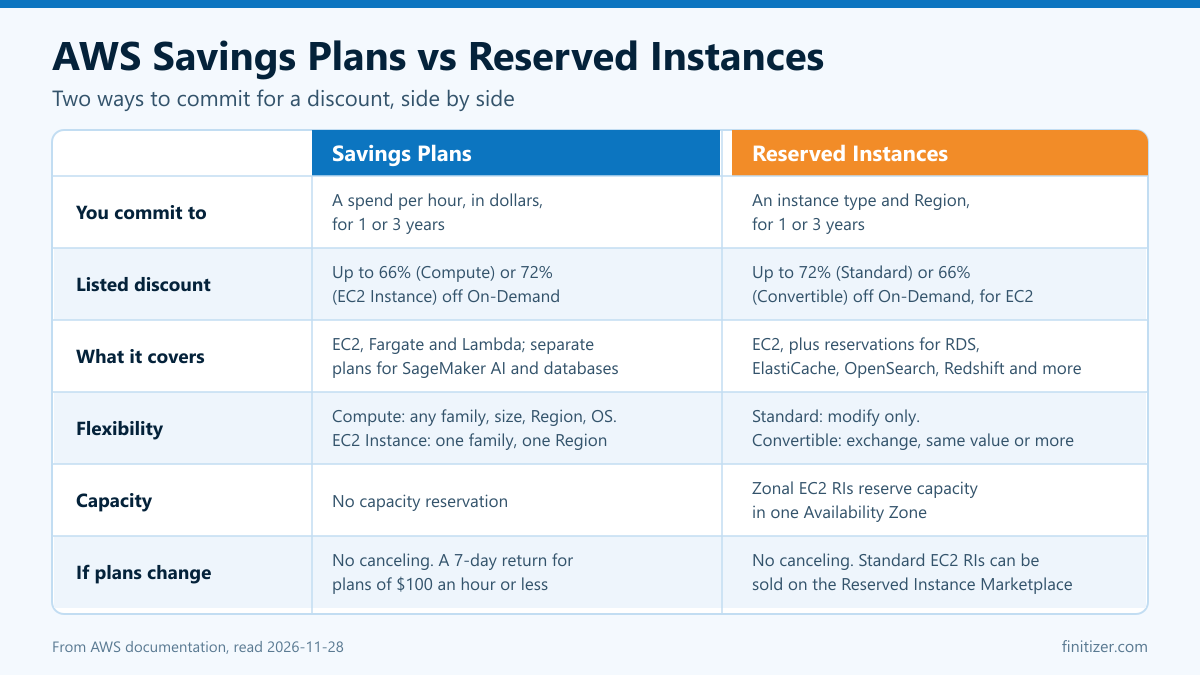
Every rule and figure on this page comes from AWS documentation, read on 2026-11-28 and listed under Sources at the end.
What each one commits you to
Both are commitments of one or three years, paid all upfront, partly upfront or with no upfront payment for most types, in exchange for rates below On-Demand. The difference is what you promise.
- A Savings Plan commits you to a dollar amount of usage per hour, for example $10 an hour of compute for three years. Eligible usage up to that amount is billed at the plan's rates, and anything above it at On-Demand prices. An hour's unused commitment is lost: it does not carry over.
- A Reserved Instance commits you to a configuration: an instance type in a Region, or in one Availability Zone for a zonal Reserved Instance. Usage that matches it gets the reserved rate.
Neither can be canceled once bought. Reserved Instances also do not renew on their own, so usage moves back to On-Demand prices on the day they expire.
The four types of Savings Plans
| Type | What it covers | Flexibility | Listed discount | Term and payment |
|---|---|---|---|---|
| Compute | EC2, Fargate (on ECS and EKS) and Lambda | Any instance family, size, Region, operating system or tenancy | Up to 66% off On-Demand | 1 or 3 years; all, partial or no upfront |
| EC2 Instance | EC2 in one instance family and one Region | Any size, operating system or tenancy within that family | Up to 72% | 1 or 3 years; all, partial or no upfront |
| SageMaker AI | SageMaker AI instance usage, such as notebooks, training, processing and inference | Any instance family, size, Region or component | Up to 64% | 1 or 3 years; all, partial or no upfront |
| Database | Aurora, RDS, DynamoDB, ElastiCache for Valkey, DocumentDB, Neptune, Keyspaces, Timestream for InfluxDB, DMS, and since March 2026 OpenSearch Service and Neptune Analytics | Any engine, instance family, size or Region, serverless or provisioned | Up to 35%, depending on the service | 1 year, no upfront only |
AWS added Database Savings Plans in December 2025. They apply to Generation 7 and newer instances only. Compute and EC2 Instance plans also cover EC2 that runs under EMR, EKS and ECS, but not the EKS service charge itself.
Where Reserved Instances still apply
On EC2, Reserved Instances come in two classes:
- Standard Reserved Instances list discounts of up to 72% off On-Demand. They can be modified, for example moved to another Availability Zone in the same Region, but not exchanged. They are the only kind you can sell on the Reserved Instance Marketplace.
- Convertible Reserved Instances list discounts of up to 66%. They can be exchanged as often as you like for one of equal or higher value, with a different instance family, operating system or tenancy, but not a different Region.
Beyond EC2, AWS sells reservations for RDS, ElastiCache, OpenSearch Service, Redshift, MemoryDB and DynamoDB, and Cost Explorer recommends purchases for each of them. Database Savings Plans now overlap with several of these. A workload cannot use a Database Savings Plan together with an RDS reservation or DynamoDB reserved capacity, and AWS suggests moving to Database Savings Plans as those reservations expire. Database Savings Plans do not list Redshift or MemoryDB, so reservations remain the commitment for those two.
The trade on databases is depth against flexibility. A reservation for one database engine and size can list a deeper discount than the 35% Database Savings Plan ceiling, but it is locked to that engine, size and Region for its whole term.
Changing your mind: returns, exchanges and resale
- Savings Plans cannot be canceled or changed after purchase. Since March 2024, a plan with an hourly commitment of $100 or less can be returned within seven days of purchase, if it is still in the same calendar month, up to 10 times a year per management account. The upfront charge is refunded in full.
- Convertible Reserved Instances can be exchanged, as above, until at least 24 hours before they expire.
- Standard EC2 Reserved Instances can be listed on the Reserved Instance Marketplace once they have been active for 30 days and have at least one month left. AWS charges a 12% fee on the upfront price, and the seller needs a US bank account. Convertible Reserved Instances and reservations for RDS or ElastiCache cannot be listed.
Capacity is a separate question
A discount is not a guarantee that the instances will be there when you need them.
- Savings Plans do not reserve capacity.
- Regional Reserved Instances do not reserve capacity either, though they apply in any Availability Zone in their Region.
- Zonal Reserved Instances reserve capacity in their Availability Zone.
- On-Demand Capacity Reservations hold capacity in an Availability Zone and are billed at On-Demand rates whether you use them or not. Savings Plans and regional Reserved Instances apply to them; zonal Reserved Instances do not.
For a launch, a peak season or a disaster recovery plan, a common pattern is a Capacity Reservation for the capacity, with a Savings Plan for the rate.
How AWS applies them on your bill
Each hour, AWS applies Reserved Instances first, then EC2 Instance Savings Plans, then Compute Savings Plans. Within a plan, the commitment goes to the usage with the highest discount percentage first.
In an AWS Organization, a commitment applies first to the account that bought it, then to other accounts with sharing turned on, which is the default. The management account can turn sharing off for any member account. In November 2026 AWS added finer controls, set with Cost Categories, so a single Reserved Instance or Savings Plan can favor or be limited to chosen accounts. Check these settings before you buy, so a plan bought for one team is not quietly used by another.
How to choose: a simple order
- Fix waste first. Rightsize and switch off idle resources before you commit, or you lock in paying for them for one to three years.
- Find your steady baseline. Look at the lowest hourly usage over the last 30 to 60 days. AWS recommendations use a lookback of 7, 30 or 60 days.
- Cover the baseline with a Compute Savings Plan. Choose an EC2 Instance Savings Plan or a Standard Reserved Instance only for usage you are confident will stay in one family and Region.
- Commit on databases with care. Use a Database Savings Plan where engines, sizes or Regions may change, and a reservation where a database will not change for the whole term. Redshift and MemoryDB need reservations.
- Plan capacity separately. Use On-Demand Capacity Reservations or zonal Reserved Instances where you need instances held.
- Buy in steps. Smaller purchases every month or quarter spread out expiry dates and let you adjust as usage changes. AWS's Savings Plans Purchase Analyzer models a purchase before you make it.
- Track it every month. Coverage, utilization and upcoming expiry dates tell you whether to buy more, exchange or let a commitment lapse.
| Your situation | Usually the better fit |
|---|---|
| A mix of EC2, Fargate and Lambda, or instance families and Regions may change | Compute Savings Plan |
| Steady EC2 usage in one family and Region | EC2 Instance Savings Plan or Standard Reserved Instance |
| Capacity must be held in one Availability Zone | Zonal Reserved Instance, or a Capacity Reservation with a Savings Plan |
| RDS, Aurora, DynamoDB, ElastiCache or OpenSearch that may change | Database Savings Plan |
| A database that will not change for the term | Compare the reservation with the Database Savings Plan rate |
| Redshift or MemoryDB | Reservations |
| You may want to sell unused commitment later | Standard EC2 Reserved Instance |
Mistakes we see
- Committing to 100% of today's usage. Peaks are better left on On-Demand. Commitment you do not use is lost every hour.
- One large purchase. Everything expires on the same day, and the bill jumps back to On-Demand prices with no change in usage. Our guide to cloud cost anomaly detection covers how to catch that.
- Forgetting expiry dates. Reserved Instances do not renew automatically.
- Ignoring sharing. A commitment can end up covering a different team's account from the one that paid for it.
Where Finitizer fits
Finitizer CloudIQ AWS plans Savings Plans and Reserved Instances from your real usage, flags idle commitments, and tracks every expiry date with a recommended next step, as part of its rate optimization work. It recommends what to buy, exchange or let expire, with the cost and break-even of each option, and your team makes the purchase. In our practitioner experience, waste reduction and design changes together put 30% to 50% of cloud spend within reach, and commitments work best once that waste is gone.
To check your own position for free, the Commitment Coverage Checker reads an AWS Cost and Usage Report in your browser, and the Commitment Sizing Calculator shows what a shortfall costs if demand comes in below plan. For a full review of your bill, start with the free Cloud Cost Assessment.
Frequently asked questions
What is the difference between AWS Savings Plans and Reserved Instances?
A Savings Plan commits you to a dollar amount of usage per hour, and the discount follows your usage across the services and configurations the plan covers. A Reserved Instance commits you to a specific instance type in a Region or Availability Zone. Both run for one or three years and cannot be canceled.
Are Savings Plans better than Reserved Instances?
For most EC2, Fargate and Lambda usage, a Compute Savings Plan is the safer choice, because it keeps its discount when you change instance families or Regions. Reserved Instances suit steady usage that will not move, capacity held in one Availability Zone, and services that Savings Plans do not cover, such as Redshift and MemoryDB.
Can you cancel or sell an AWS Savings Plan?
You cannot cancel a Savings Plan. A plan with an hourly commitment of $100 or less can be returned within seven days of purchase, in the same calendar month, for a full refund of the upfront charge. The Reserved Instance Marketplace is for Standard EC2 Reserved Instances only.
Do Savings Plans reserve capacity?
No. Savings Plans and regional Reserved Instances give a discount but hold no capacity. Zonal Reserved Instances and On-Demand Capacity Reservations hold capacity in an Availability Zone. A Savings Plan's discount does apply to a Capacity Reservation, so the two can be combined.
Do Savings Plans cover RDS and other databases?
Yes, since December 2025. Database Savings Plans cover Aurora, RDS, DynamoDB, ElastiCache for Valkey, DocumentDB, Neptune, Keyspaces, Timestream for InfluxDB, DMS, OpenSearch Service and Neptune Analytics, for one year with no upfront payment. Redshift and MemoryDB still use reservations.
Sources
AWS documentation, read on 2026-11-28:
- Savings Plans: plan types, what Savings Plans are, Savings Plans and Reserved Instances compared, how Savings Plans apply, returning a Savings Plan, Purchase Analyzer, Savings Plans FAQs, Database Savings Plans launch, OpenSearch Service and Neptune Analytics added
- Reserved Instances: EC2 Reserved Instances, EC2 Reserved Instance pricing, regional and zonal scope, exchanging Convertible Reserved Instances, Reserved Instance Marketplace, reservation recommendations
- Capacity and sharing: Capacity Reservation billing, sharing Reserved Instances and Savings Plans, new sharing controls, November 2026