How to Choose Cloud Cost Management Tools
What a cloud cost management tool does
A cloud cost management tool reads your cloud bill and usage, shows where the money goes, and helps you spend less on the same work. The better ones go past charts: they find specific resources to change, size commitments such as Savings Plans, flag unusual spend, split costs by team, and check afterwards that a change actually lowered the bill.
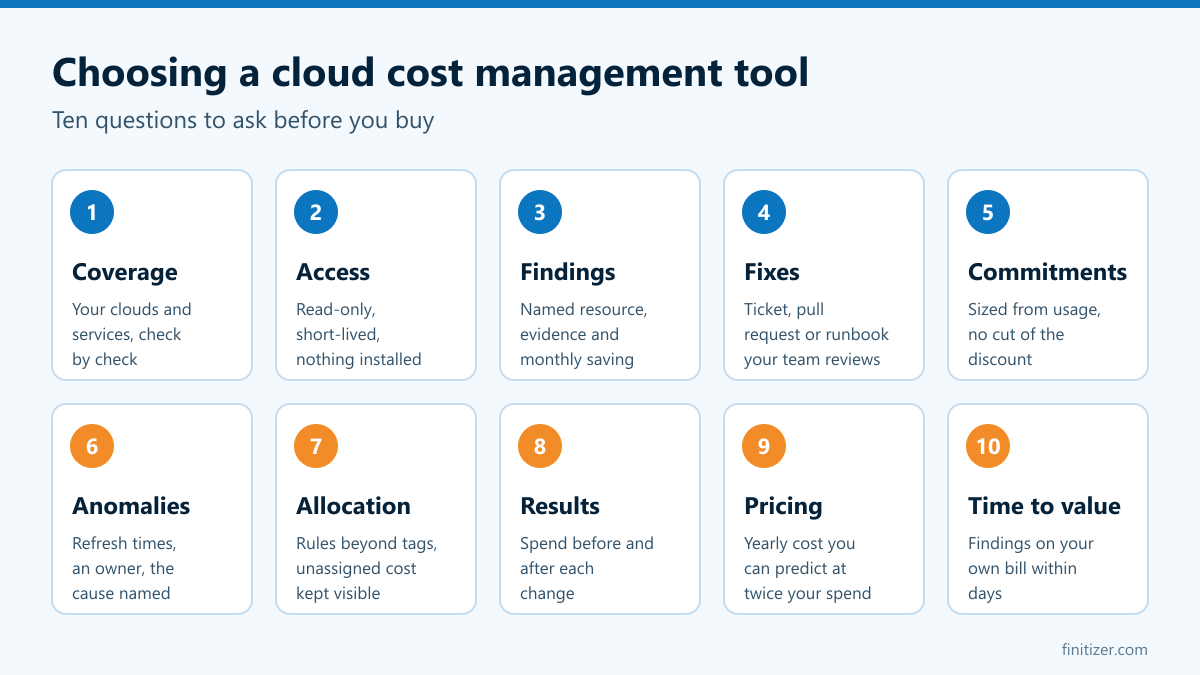
This guide is for the person who has to pick one: a FinOps lead, a platform or engineering manager, or a finance partner who owns the cloud budget. It covers when the free tools from your cloud provider are enough, the ten questions that separate tools, and how the pricing models compare.
Start with the tools your cloud already gives you
Every major cloud includes cost tools at no extra charge, and for a single account with a modest bill they may be all you need.
- AWS: Cost Explorer for spend by service and account, AWS Budgets for alerts, Cost Anomaly Detection for unusual spend, and Savings Plans and Reserved Instance recommendations.
- Google Cloud: Cloud Billing reports, budgets and alerts, the billing export to BigQuery for your own queries, and Recommender for idle and oversized resources.
- Microsoft Azure: Cost Management for cost analysis, budgets and anomaly alerts, and Azure Advisor for cost recommendations.
These tools are accurate, because they read the provider's own billing data. Their limits show up as you grow: each covers one cloud, recommendations arrive without an owner or a ready change, and nobody checks whether last month's fix stuck.
Signs you have outgrown the native tools
- You run more than one cloud, or many accounts and projects, and nobody sees the whole bill in one place.
- Recommendations pile up because turning one into a change takes an engineer's afternoon.
- Commitment decisions (Savings Plans, Reserved Instances, committed use discounts) are made once a year from a spreadsheet.
- Finance asks what each team or product costs, and the answer depends on tags nobody maintains.
- AI and data platform spend is growing, and it sits outside the views you already have.
Ten questions to ask before you buy
1. Which clouds and services does it cover?
Check the clouds you run today and the ones you expect in two years. Then go one level down: compute is covered everywhere, but databases, Kubernetes, data warehouses, networking and AI services are where coverage differs. Ask for the list of checks, not the list of logos.
2. What access does it need?
A tool that only reads billing data and resource configuration needs read-only access. Prefer short-lived credentials, such as a role the tool assumes, over long-lived keys you have to store and rotate. Ask what data it reads, where that data is kept, and whether anything is installed in your accounts.
3. Does it find waste at the resource level, with evidence?
A chart that says compute went up is not a finding. A useful finding names the resource, shows the usage that makes it wasteful, estimates the monthly saving and states the risk of changing it. Ask to see a real finding, start to finish.
4. How does a finding become a change?
This is where most savings are lost. Ask how a recommendation reaches the engineer who owns the resource: a ticket, a pull request with the change written as code, a runbook with rollback steps. Ask who approves each change. Be careful with tools that change production on their own: your engineers should review every change.
5. Does it handle commitments, and how is that priced?
Savings Plans, Reserved Instances and committed use discounts are often the largest single lever on a bill. Ask how the tool sizes them from your real usage, how it tracks coverage and idle commitments, and whether its fee is a share of the discount. A percentage of savings on commitments you would have bought anyway is an expensive way to buy them.
6. Does it catch unusual spend, and how fresh is the data?
Anomaly alerts are only as fresh as the billing data behind them. Provider billing data typically arrives hours after the usage, so be wary of any tool that promises to stop a runaway bill the moment it starts. Ask how often data refreshes, who receives an alert, and whether the alert explains the cause. See our guide to cloud cost anomaly detection.
7. Can it split costs by team without perfect tags?
Tags help, but no organization tags everything. Ask how the tool handles untagged and shared costs: rules by account, project or name, and a visible line for what cannot be assigned. Our cloud cost allocation guide covers the methods.
8. Does it measure the result after a change?
The only saving that counts is one you can see in a later bill. Ask whether the tool compares spend before and after each change, and whether it tells you when a saving did not appear or was reversed by the next deployment.
9. How is it priced?
Common models are a percentage of cloud spend, a percentage of the savings found, a flat subscription, or a fee per seat or per resource. Work out the yearly cost at your current spend and at twice your spend, read the minimum contract length, and ask what happens to your data when you leave.
10. How long until the first useful finding, and can you try it first?
Ask how long onboarding takes and when you will see ranked findings. The best test is your own bill: a short trial or a free assessment on your real billing data tells you more than any demo.
A simple scorecard
| Question | What a strong answer looks like |
|---|---|
| Coverage | The services you actually pay for, listed check by check |
| Access | Read-only, short-lived credentials, nothing installed |
| Findings | Named resource, evidence, estimated monthly saving, risk |
| Fixes | A ticket, pull request or runbook your engineers review |
| Commitments | Sized from your usage; fee not a cut of the discount |
| Anomalies | Clear refresh times, an owner for each alert, the cause named |
| Allocation | Rules beyond tags, with unassigned cost shown |
| Results | Before and after spend for each change |
| Pricing | A yearly figure you can predict at twice your spend |
| Time to value | Findings on your own data within days |
Mistakes we see when teams buy
- Buying a dashboard nobody acts on. Visibility without a path to change produces reports, not savings.
- Starting with a tagging project. Tags matter for allocation, but idle and oversized resources can be found and fixed without them.
- Paying a share of savings on commitments. Size commitments well, but keep the discount.
- Leaving engineers out of the choice. If the tool does not fit how your team ships changes, findings will wait in a queue.
Where Finitizer fits
Finitizer CloudIQ is cloud cost management software sold as two products: Finitizer CloudIQ AWS and Finitizer CloudIQ GCP, BigQuery included. Each works from read-only access with no keys stored, ranks findings by estimated monthly saving, prepares each fix as Terraform, a runbook or a Jira ticket for your engineers to review, and measures the result after release. Each is $500 a month when your yearly spend on that cloud is under $5M. CloudIQ does not cover Azure today. In our practitioner experience, waste reduction and design changes together put 30% to 50% of cloud spend within reach.
For AI spend across model APIs and coding tools, Finitizer Tokenomics is a separate product. To test any of this on your own bill first, the free Cloud Cost Assessment reads an AWS, Azure or Google Cloud billing export and shows where you may be overspending, with no access to your cloud accounts.
Frequently asked questions
What is a cloud cost management tool?
Software that reads your cloud billing and usage data to show where money goes and how to spend less. Good ones find specific resources to change, size commitments such as Savings Plans, flag unusual spend, split costs by team, and check that each change actually lowered the bill.
Are the free cost tools from AWS, Google Cloud and Azure enough?
For one cloud, a few accounts and a modest bill, often yes. They are accurate and free. Teams usually add a dedicated tool when they run several clouds, need findings turned into reviewed changes, want commitments sized more often, or need costs split by team beyond what tags cover.
How are cloud cost management tools priced?
The common models are a percentage of cloud spend, a percentage of savings found, a flat subscription, or a fee per seat or resource. Compare the yearly cost at your current spend and at twice that spend, and check the minimum contract term before you sign.
What access should a cloud cost management tool need?
Read-only access to billing data and resource configuration is enough to find waste. Prefer a role the tool assumes with short-lived credentials over stored keys, and nothing installed in your accounts. Changes should reach your engineers as tickets or pull requests for review, not be made by the tool.
How can I try a cloud cost management tool before buying?
Ask for a trial or an assessment on your own billing data rather than a demo account. Finitizer's free Cloud Cost Assessment reads an AWS, Azure or Google Cloud billing export and shows where you may be overspending, without connecting to your cloud accounts.